Production-Grade (ish) Rails deployment on Hetzner with Kamal
A two-server Kamal deployment on Hetzner: one exposed web server, one locked-down accessories server for Postgres, Redis, and backups, reachable only via SSH jump host. Covers the Terraform setup for provisioning, splitting background jobs by priority, and configuring Traefik for automatic SSL.
I’ve been toying around with Kamal for some time now, and I believe I have come up with a nice setup for a reasonably robust deployment. It includes two servers, one for the application and another for database and caching, a firewall to expose only the ports we need (e.g., the database server is not exposed at all), and automated backups. Let’s get down to business.
Part 1: Setting up the servers
While experimenting with Kamal, I was frustrated with the manual labor for setting up and tearing down servers on Hetzner. It was a lot of steps, and since I wanted to customize a couple of things, I also needed to update and/or install things on the server before the deployment. I created a Terraform script to do that for me; you can copy it here.
Here is what the final architecture looks like:
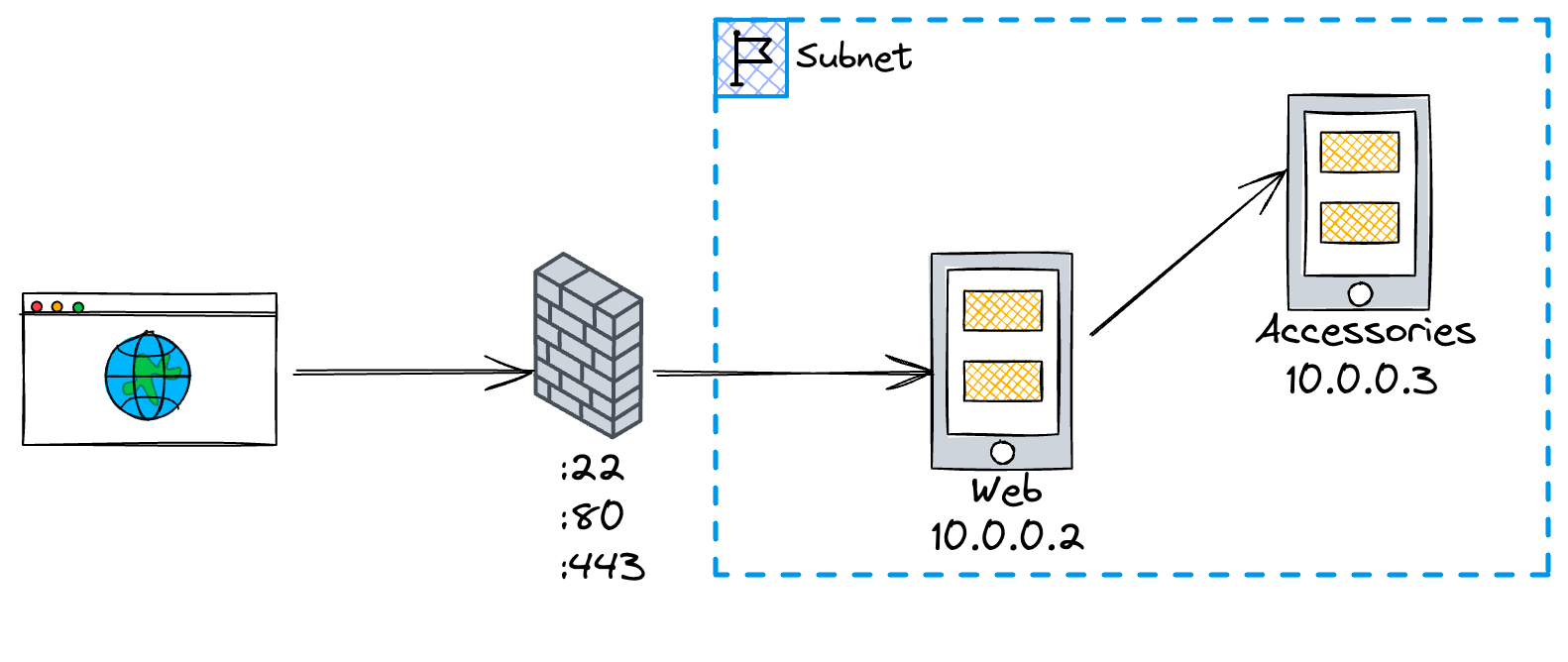
deployment topology
Trace the server boundary
web
Accepts public traffic, runs Traefik and the Rails application, and is the only host reachable directly over SSH.
accessories
Runs PostgreSQL, Redis, and backups on the private subnet. Reach it through ssh accessories, which jumps through web.
Only the web server is exposed, accessories is blinded from outside access. They are on the same subnet, so they can communicate freely. The only way to ssh into accessories is by using web as a jump server. No root password is set; Login is possible using a private/public key.
Here is what my SSH configuration looks like:
  HostName <public IP>  User root  PreferredAuthentications publickey
Host accessories  HostName 10.0.0.3  User root  PreferredAuthentications publickey  ProxyJump web
~/.ssh/config
With this configuration, I don’t need to use the IP address when configuring Kamal. I will show this later on.
I also used cloud-init to customize some things:
- upgrade packages
- update nameservers
- set the timezone to Berlin
- creates a file where our Let’s Encrypt will be stored, with the correct permissions
- (for accessories, because of Redis) set
vm.overcommit_memory=1. Here is why this is important
You can check both customizations under the cloudinit folder.
Part 2: Configuring Kamal
The app I’m deploying uses the following resources:
- PostgreSQL as database
- Redis for cache
- Good Job for background processing
Let’s start with configuring the Rails application and the background jobs:
service: <your app name>
image: <username>/image
servers:  web:    hosts:      - web    labels:      traefik.http.routers.sumiu.rule: Host(`sumiu.link`)      traefik.http.routers.sumiu_secure.entrypoints: websecure      traefik.http.routers.sumiu_secure.rule: Host(`sumiu.link`)      traefik.http.routers.sumiu_secure.tls.certresolver: letsencrypt    env:      secret:        - GOOD_JOB_USERNAME        - GOOD_JOB_PASSWORD  urgent_job:    hosts:      - web    env:      clear:        CRON_ENABLED: 1        GOOD_JOB_MAX_THREADS: 10 # Number of threads to process background jobs        DB_POOL: <%= 10 + 1 + 2 %> # GOOD_JOB_MAX_THREADS + 1 + 2        NEW_RELIC_APP_NAME: sumiu-urgent-job    cmd: 'bundle exec good_job --queues urgent'  low_priority_job:    hosts:      - web    env:      clear:        GOOD_JOB_MAX_THREADS: 3 # Number of threads to process background jobs        DB_POOL: <%= 3 + 1 + 2 %> # GOOD_JOB_MAX_THREADS + 1 + 2        NEW_RELIC_APP_NAME: sumiu-low-priority-job    cmd: "bundle exec good_job --queues '+low_priority:2;*'"
There’s not much happening in the web application (not to be confused with the web server name) other than some labels we set up for Traefik (more on that later).
On the background jobs part, though, some things are worth mentioning. I set up two distinct processes, one for urgent jobs (urgent_job) and another process for low-priority jobs (and everything else). The DB_POOL variable needs to match the GOOD_JOB_MAX_THREADS configuration as per the documentation: We need the pool size to be MAX_THREADS + 1 connection used by the job listener + 2 connections used by the cron scheduler and executor.
capacity check
Good Job pool calculator
10 worker threads + 1 listener + 2 scheduler and executor connections
This is what my database configuration looks like
production: <<: *default url: <%= ENV["DATABASE_URL"] %> pool: <%= ENV["DB_POOL"] || ENV.fetch("RAILS_MAX_THREADS", 5).to_i %>config/database.yml
For Good Job, it uses DB_POOL and for Rails, it uses RAILS_MAX_THREADS.
Part 2.1: Accessories
I’m just gonna dump the accessories part of the configuration and then break it down
accessories:  db:    image: postgres:16-alpine    host: accessories    port: 5432    env:      clear:        POSTGRES_USER: postgres        POSTGRES_DB: postgres      secret:        - POSTGRES_PASSWORD    directories:      - data/postgres:/var/lib/postgresql/data    files:      - infrastructure/postgres/postgresql.conf:/usr/local/share/postgresql/postgresql.conf.sample
  redis:    image: redis:7-alpine    host: accessories    port: 6379    directories:      - data/redis:/data    files:      - infrastructure/redis/redis.conf:/etc/redis/redis.conf      - infrastructure/redis/redis-sysctl.conf:/etc/sysctl.conf    cmd: redis-server /etc/redis/redis.conf
  backups:    image: eeshugerman/postgres-backup-s3:16    host: accessories    env:      clear:        SCHEDULE: '@daily' # optional        BACKUP_KEEP_DAYS: 7 # optional        S3_BUCKET: pg-sumiu-backups        S3_PREFIX: backup        POSTGRES_HOST: 10.0.0.3        POSTGRES_DATABASE: sumiu_production        POSTGRES_USER: postgres      secret:        - POSTGRES_PASSWORD        - S3_ACCESS_KEY_ID        - S3_SECRET_ACCESS_KEY
For PostgreSQL, I’m using version 16, an Alpine-based image with some custom configuration (I’ve used PgTune). What is worth noting here is that files section where I’m mounting my custom posgresql.conf onto postgresql.conf.sample. During the image setup, the .sample file gets copied within the image and becomes the postgesql.conf file used by Postgres. If you mount the file directly over /etc/postgres/postgresql.conf , you will see an error message, saying the database couldn’t be set up because the db directory is not empty, so, pay attention to that.
I’m customizing Redis for cache since the default key eviction is to not evict but return an error. I mounted my redis.conf file onto /etc/redis/redis.conf with the following setup:
bind 0.0.0.0 ::port 6379
protected-mode no
dir /data
tcp-backlog 511
maxmemory 128mbmaxmemory-policy allkeys-lru
redis.conf
I’m also backing up my database daily using Postgres Backup S3 image. It is pretty handy and it includes commands to manually trigger a deployment or a restoration.
Part 3: Traefik and SSL
This is my Traefik setup
traefik: image: traefik:v2.10.7 options: publish: - '443:443' volume: - '/letsencrypt/acme.json:/letsencrypt/acme.json' args: entryPoints.web.address: ':80' entryPoints.websecure.address: ':443' entryPoints.web.http.redirections.entryPoint.to: websecure entryPoints.web.http.redirections.entryPoint.scheme: https entryPoints.web.http.redirections.entrypoint.permanent: true certificatesResolvers.letsencrypt.acme.storage: '/letsencrypt/acme.json' certificatesResolvers.letsencrypt.acme.httpchallenge: true certificatesResolvers.letsencrypt.acme.httpchallenge.entrypoint: webRemember the labels on the web section? This is where the magic happens: Traefik will generate a certificate for us and redirect the traffic to the websecure entrypoint, which is our application.
Conclusion
With this configuration, deploying is a matter of running two commands
$ terraform apply$ kamal setupThanks to Guillaume Briday and Adrien Poly for the inspiration!
One more thing…
I figure someone might like to see the whole config file I’m using. Here it is:
service: sumiu
image: <dockerhub_username>/<app_name>
servers: web: hosts: - web labels: traefik.http.routers.sumiu.rule: Host(`sumiu.link`) traefik.http.routers.sumiu_secure.entrypoints: websecure traefik.http.routers.sumiu_secure.rule: Host(`sumiu.link`) traefik.http.routers.sumiu_secure.tls.certresolver: letsencrypt env: clear: NEW_RELIC_APP_NAME: sumiu-web secret: - PGHERO_USERNAME - PGHERO_PASSWORD - GOOD_JOB_USERNAME - GOOD_JOB_PASSWORD urgent_job: hosts: - web env: clear: CRON_ENABLED: 1 GOOD_JOB_MAX_THREADS: 10 # Number of threads to process background jobs DB_POOL: <%= 10 + 1 + 2 %> # GOOD_JOB_MAX_THREADS + 1 + 2 NEW_RELIC_APP_NAME: sumiu-urgent-job cmd: 'bundle exec good_job --queues urgent' low_priority_job: hosts: - web env: clear: GOOD_JOB_MAX_THREADS: 3 # Number of threads to process background jobs DB_POOL: <%= 3 + 1 + 2 %> # GOOD_JOB_MAX_THREADS + 1 + 2 NEW_RELIC_APP_NAME: sumiu-low-priority-job cmd: "bundle exec good_job --queues '+low_priority:2;*'"
registry: username: luizkowalski password: - KAMAL_REGISTRY_PASSWORD
env: clear: RAILS_MAX_THREADS: 3 WEB_CONCURRENCY: 2 RAILS_ENV: production secret: - DATABASE_URL - RAILS_MASTER_KEY - SENTRY_DSN
builder: remote: arch: amd64 host: web cache: type: registry args: GIT_REV: <%= `git rev-parse --short HEAD` %> BUILD_DATE: <%= `date -u +"%Y-%m-%dT%H:%M:%S %Z"` %>
accessories: db: image: postgres:16-alpine host: accessories port: 5432 env: clear: POSTGRES_USER: postgres POSTGRES_DB: postgres secret: - POSTGRES_PASSWORD directories: - data/postgres:/var/lib/postgresql/data files: - infrastructure/postgres/postgresql.conf:/usr/local/share/postgresql/postgresql.conf.sample redis: image: redis:7-alpine host: accessories port: 6379 directories: - data/redis:/data files: - infrastructure/redis/redis.conf:/etc/redis/redis.conf - infrastructure/redis/redis-sysctl.conf:/etc/sysctl.conf cmd: redis-server /etc/redis/redis.conf backups: image: eeshugerman/postgres-backup-s3:16 host: accessories env: clear: SCHEDULE: '@daily' # optional BACKUP_KEEP_DAYS: 7 # optional S3_BUCKET: pg-sumiu-backups S3_PREFIX: backup POSTGRES_HOST: 10.0.0.3 POSTGRES_DATABASE: sumiu_production POSTGRES_USER: postgres secret: - POSTGRES_PASSWORD - S3_ACCESS_KEY_ID - S3_SECRET_ACCESS_KEY
healthcheck: max_attempts: 20
traefik: image: traefik:v2.10.7 options: publish: - '443:443' volume: - '/letsencrypt/acme.json:/letsencrypt/acme.json' # To save the configuration file. args: # accesslog: true # accesslog.format: json entryPoints.web.address: ':80' entryPoints.websecure.address: ':443' entryPoints.web.http.redirections.entryPoint.to: websecure entryPoints.web.http.redirections.entryPoint.scheme: https entryPoints.web.http.redirections.entrypoint.permanent: true certificatesResolvers.letsencrypt.acme.storage: '/letsencrypt/acme.json' certificatesResolvers.letsencrypt.acme.httpchallenge: true certificatesResolvers.letsencrypt.acme.httpchallenge.entrypoint: web
asset_path: /rails/public/assets
primary_role: web